Since Thursday 8 October 2026, Google Maps and Waze show near real-time petrol and diesel prices for UK forecourts. Search "petrol" or "fuel" and nearby stations appear with their prices. The data comes from Fuel Finder, the government scheme that has required UK petrol stations to report price changes within 30 minutes since February. The government says comparing prices can save a household with a car around £40 a year, which matters now that diesel has topped £2 a litre. If you want fuel prices in the same app as your MOT and tax reminders, Motorbook has a fuel map built in.
Compare prices at a glance: Motorbook's fuel map
Motorbook's Fuel near you screen is built for one job: seeing what fuel costs around you before you set off. Open the Nearby tab and every forecourt on the map carries its price, so you can zoom out to see the wider area or zoom in on your street and spot the cheapest pump without tapping into each station.
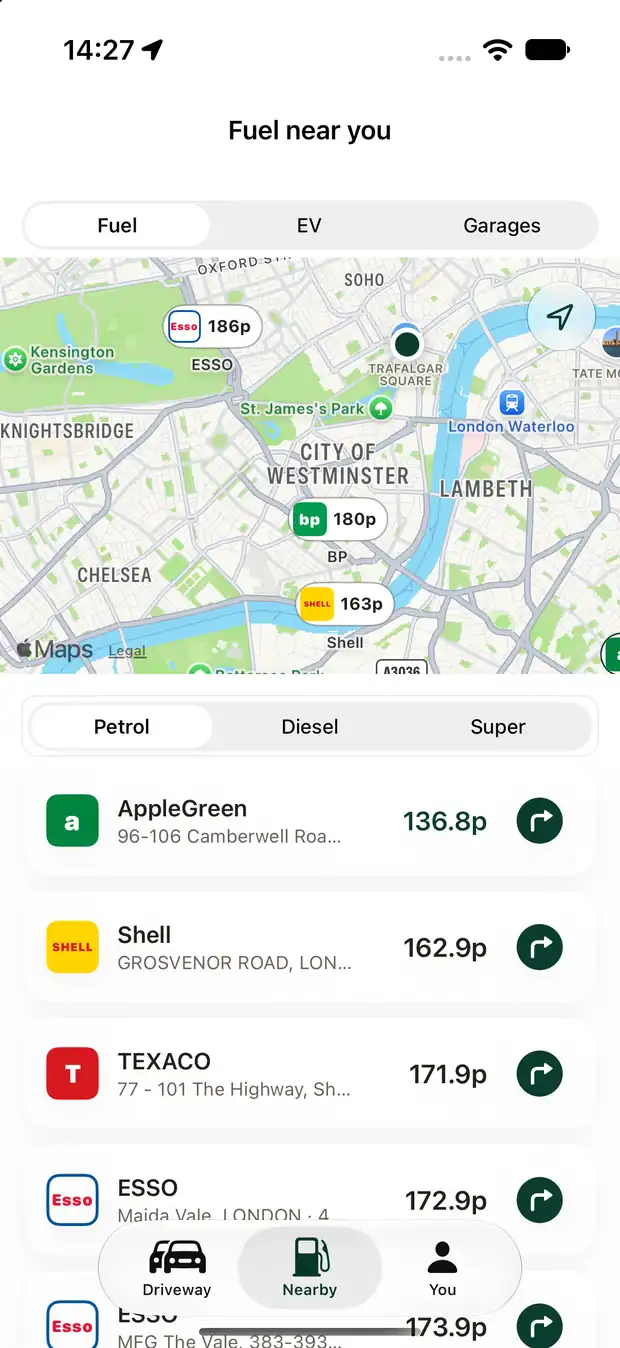
- Prices on the map. Each nearby forecourt shows its price on its pin, so the map itself is the comparison.
- Switch fuel in one tap. Petrol, diesel or super, so you only see the price you will actually pay.
- A list underneath. Stations and prices for the fuel you picked, with a button for directions.
- More than fuel. The same screen has tabs for EV charge points and garages.
- Private. No account. Your location is used only to find stations near you.
Motorbook's prices come from the government's Fuel Finder data, the same scheme behind the new Google Maps prices, which lists about 8,100 UK forecourts. Like any app using it, a price can lag behind the pump, so treat it as a guide. Fuel sits alongside the dates that cost far more when forgotten: your MOT (a lapsed one can mean a fine of up to £1,000), road tax and insurance renewal.
Contains Fuel Finder data, OGL v3. About the data: Fuel Finder on GOV.UK.
What was announced
Prime Minister Andy Burnham announced the change on X on the morning of 8 October: "From today, you'll be able to see petrol and diesel prices on Google Maps, compare nearby stations and find the cheapest option before you fill up. It's a small change, but if there's a practical way to help people keep more money in their pocket, I'll do it."
The GOV.UK announcement adds the detail:
- Petrol and diesel prices appear in Google Maps for the first time in the UK.
- Fuel Finder now covers around 99% of all fuel sold on UK roads.
- The scheme follows a recommendation from the Competition and Markets Authority (CMA), which can act against stations that do not comply.
Google's post says you can search "petrol" or "fuel" to see the latest prices, view petrol and diesel rates on the map, and see prices for every fuel a station sells in one place.
Not everyone was impressed. Critics said showing prices does not lower them and called for a cut in fuel duty instead, as the Express and HuffPost UK reported. Both points can be true: transparency will not change the price of oil, but it can stop you paying more than you need to locally.
How reliable is the data?
Since 2 February 2026, anyone running a UK petrol station must report a price change within 30 minutes or risk a fine. The data is open, which is why apps such as Waze, PetrolPrices, the AA, Confused.com and RAC Fuel Watch were already using it.
It is not perfect yet. PetrolPrices told the BBC that some sites have not registered and others update late, and it found 200 forecourts in September that it believed had not updated diesel prices in time. Google says it will only show a price when it has "high confidence that it's the right price", so you may see a station without one. Whichever app you use, the price on the pump is the one that counts.
How to check fuel prices near you
- Google Maps or Waze. Search "petrol" or "fuel". Handy if you are already navigating, and 77% of UK adults use Google Maps. Apple Maps does not show fuel prices.
- Price comparison apps and sites. PetrolPrices, the AA, Confused.com and RAC Fuel Watch all show local prices.
- Motorbook. The Nearby tab puts prices on the map for the forecourts around you, next to your MOT, tax and service records.
Practical ways to pay less at the pump
- Check before you need fuel. Look at prices with a quarter of a tank left, so you can choose rather than settle.
- Compare a few miles out. Supermarket forecourts are often cheaper, but not always. A short detour can pay on a full tank. A long one rarely does.
- Compare the right fuel. Diesel, petrol and super grades move differently.
- Treat a missing price with caution. No price usually means the data is not trusted. Do not assume it is cheap.
- Drive smoothly. Gentle acceleration, steady speeds and correct tyre pressures all cut how much you burn.
- Track what you spend. Logging fill-ups shows your real monthly cost. Our 14 ways to cut UK car running costs has more ideas.
For why prices are so high, see UK diesel hits an all-time high.
Frequently asked questions
When did fuel prices appear on Google Maps in the UK?
On Thursday 8 October 2026. Google Maps and Waze now show near real-time petrol and diesel prices for UK forecourts, using the government's Fuel Finder data.
How do I see fuel prices on Google Maps?
Open Google Maps and search "petrol" or "fuel". Nearby stations appear with their prices, and you can see prices for each fuel a station sells.
Are the prices always accurate?
Mostly, but not always. Some stations are slow to update or not registered. Google only shows a price when it is confident it is correct, so some stations appear without one.
Does Apple Maps show fuel prices?
Not at the moment. On iPhone you can use Google Maps, Waze, a price comparison app, or Motorbook's fuel map.
Is there an app that shows fuel prices on a map with MOT and tax reminders?
Yes. Motorbook shows fuel prices on a map for the forecourts near you, alongside MOT, tax and insurance reminders. It needs no account and is free for two cars.
General information only, not financial advice. Facts from GOV.UK, Google, the BBC and the Prime Minister's X post of 8 October 2026; always check the price on the pump before you fill up.
Motorbook is independent and is not affiliated with GOV.UK, DESNZ or Google.